



in:Flux 4.41
170 $
in:Flux is CFD software from Insight Numerics for 3D ventilation, gas dispersion, and fire modeling in complex plant and offshore geometries. Automated meshing, case setup, and batch scheduling let engineers run risk-based gas mapping and jet/pool fire studies without a specialist CFD team. Import CAD (DGN, DWG, STEP, Navisworks), post-process isosurfaces and risk contours, and solve hundreds or thousands of cases locally or with in:Flux Cloud…
Description

🔬 in:Flux 4.41 — CFD Software for Gas Dispersion, Ventilation & Fire Modeling
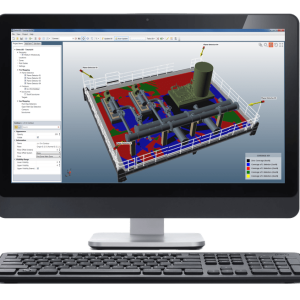
in:Flux 4.41 is the current 4.x build of Insight Numerics’ Windows CFD software for 3D ventilation studies, flammable and toxic gas dispersion, jet and pool fires, and risk-based gas mapping. It is made for process-safety, fire-and-gas, and facility engineers who need defensible CFD on real plant and offshore CAD — without writing mesh scripts or outsourcing every wind/leak matrix.
4.41 sits on the published 4.x line: automated meshing and scheduling from v4.0, monitor filters and searchable cases from v4.40 (10 Feb 2026), plus licensed maintenance updates. Insight Numerics has not posted a separate public 4.41 highlights page; treat this listing as the current installer for buyers who already see 4.41 in the user portal or in Help → About.
🎯 Who this product is for
- 🔥 Fire & gas mapping teams that need CFD clouds, not only geographic spheres
- 🌬️ HVAC / indoor ventilation engineers working inside modules, turbines, and buildings
- ⛽ Loss-prevention and QRA groups building leak × wind matrices
- 🏗️ EPCs and owner-operators who already use Detect3D® and want the same CAD in CFD
- 💻 Engineers who must run 100–10,000 cases from a laptop, then post-process later
🧩 What in:Flux 4.41 actually does
Import the facility geometry, set wind and inflows, and let the software size the domain, generate the mesh, and queue the solver. While ventilation cases run, you add high-pressure leaks, blowdown, exhausts, or HVAC. When results exist, you add contours, vectors, streamlines, isosurfaces, monitors, and risk datasets — you do not have to guess probe planes before the run.
Typical project types
- 💨 Outdoor wind fields around congested decks and pipe racks
- 🏠 Indoor ventilation with passive or forced inlets, outlets, and fans
- 💥 High-pressure hydrocarbon and multi-component gas releases
- ☠️ Toxic dispersion with dose / probit fatality options
- 🔥 Jet fires and evaporating pool fires (temperature, radiation, soot, products)
- 📍 Risk-based gas mapping using leak frequencies and wind-rose probabilities
- 🚁 Helideck turbulence studies (SST plus RSTM for CAP 437 / NORSOK-style work)
✨ Highlights in the 4.x series (what you get with 4.41)
☁️ in:Flux Cloud — from v4.0 (26 June 2025)
Open Project → Cloud Manager or use the main Run button. Select cases; Insight Numerics deploys Microsoft Azure VMs (typically about one machine per simulation). A 1,000-case matrix can finish in roughly the wall-clock time of the slowest case, not 1,000 × that time. Results stream back for post-processing. Cloud credits are extra (published figure: USD $3 per simulation). Demo licenses cannot use Cloud.
💾 Faster files, toxic/fire assessment — from v4.0
- 📁 New .ifx format — quicker save/load than older project files
- ☠️ Toxic chemical probits in the fluids database (e.g. ammonia)
- ⏱️ Dose recorded on transients; exposure time selectable on steady runs
- 🗺️ Maximum footprint option on risk contours and isosurfaces
- 🌬️ Transient volume-flow profiles for HVAC inlets, outlets, and fans
- 🔥 Peak surface radiative heat flux (useful vs other fire codes such as KFX)
- 🧪 Improved hydrogen-fire spectral radiation vs earlier versions that under-predicted
🔍 Filters, monitors & searchable cases — from v4.40
- 📈 Several transient profiles in one monitor window
- 🧮 Filters on all monitor-data tables (pull one case out of a huge matrix)
- 🎛️ Filters on menus that list every simulation (e.g. “Set All to Simulation”)
- 💬 Quoted phrases in object filters for exact-name search
- 📋 Copy to clipboard + apply monitor settings to all visuals
- 🎨 New color picker for colored project items
- ⚠️ Confirmation before deleting a risk dataset
- ☁️ Better cloud load for projects that include .ifxs solver data files
🛠️ Stability fixes in the 4.4x line
Last official bug list is v4.40. 4.41 is sold as the follow-on licensed build that inherits these fixes:
- 🧯 Risk Analysis window no longer crashing from UI errors
- ☢️ Maximum fatality contours corrected for incident radiation variables
- 🔄 Risk analyses update correctly after refresh from data files
- 🐢 Faster load when contours are set to line type
- 📍 Monitor points and lines now stay in gas-detector optimization after that window is closed
If your portal installer notes extra 4.41-only patches, paste them under this heading after install — do not invent them for Google.
🖥️ How you compute (three official paths)
- 💻 Local — in:Flux on one PC, cases in series via the built-in scheduler (start/stop anytime; prioritize urgent runs)
- 🖥️ Distributed — split the project into solver files and run on extra machines with an ifx:Solve unlimited-seat license
- ☁️ in:Flux Cloud — one VM per case, no extra HPC rack in your office
Setup and pictures stay on a normal laptop. The heavy math can leave the laptop.
📐 CAD, physics & workflow (the facts buyers search for)
- 📂 Import DGN, DWG, DXF, IGES, STEP, OBJ, STL and Navisworks via DWF — surfaces are not replaced by a toy block model
- 🧠 Domain size, mesh, boundary setup, and solution monitoring are automated after you pick wind and inflows
- 📊 Solver: 3D RANS, at least second-order discretisation, UMIST TVD on convection, SST turbulence; buoyancy in momentum and k
- 🧪 Multi-component leaks; LFL / UFL / stoichiometry calculated; AIChE® DIPPR® fluids database
- 🔥 Hydrocarbon CxHy and CxHyOz (HCO) fire reactions, plus user reactions for non-DIPPR fluids
- 📈 Post-process after the run: contours, vectors, streamlines, isovolumes, monitors, risk isosurfaces
- 🔗 Works beside Detect3D® for geographic F&G mapping + CFD consequence
💻 System requirements
| Item | Requirement |
|---|---|
| 🖥️ OS | Windows 10 or newer, x64 only |
| 📦 Prerequisite | Microsoft .NET Framework 4.8 |
| ⚙️ Minimum | 2.0 GHz CPU, 8 GB RAM, integrated GPU, 2 GB free disk |
| 🚀 Recommended | 2.5 GHz, 4+ cores, 16 GB RAM, 2 GB dedicated graphics, 2 GB free disk |
Do not install on 32-bit Windows. Avoid saving live projects only to aggressive sync folders (OneDrive/Dropbox) — file locks are a known class of issue on this stack.
🔑 Licensing snapshot
- 👀 Viewing mode — open results, no edits
- 🧪 Demo — typically 10 days, first PC only, no save, no Cloud
- 🏢 Network seat — full edit/run/save; 1 / 2 / 3 / 6 / 12 month terms; not tied to one country or office
- 🖥️ ifx:Solve — unlimited seats for distributed solvers
- ☁️ Cloud credits — pay per simulation, not per CPU-hour
Paid licenses include technical support, maintenance, and version updates. That is why 4.41 can appear in the portal before a marketing article exists.
💡 Interesting facts (good for people and for Google)
- 🏁 in:Flux shipped in January 2018, after Detect3D had already become a common F&G mapping tool
- ⏱️ Insight Numerics’ own positioning: in-house CFD instead of 2–6 week vendor queues; one public user quote put a job at “about 6 hours in in:Flux”
- 🧮 Risk-based gas mapping has been in the product since v1.20 (January 2019) — frequencies × wind rose → automatic case matrix
- ☁️ A public Cloud webinar walked through 1,000+ CFD cases in under 45 minutes on v4.0+
- 💰 Published Cloud example: 100 cloud runs ≈ $300 at $3/case
- 📁 Solver files (.ifxs) for big splits often land between hundreds of MB and tens of GB each
- 🆓 Viewing mode lets other disciplines open the same results without buying another edit seat
📦 What to put on the order / download page
Product name: in:Flux 4.41 CFD Software (Insight Numerics)
Includes: current 4.x Windows x64 installer access for a licensed seat, Cloud Manager (credits sold separately), ifx:Solve option, viewing mode, documentation at help.insightnumerics.com
Best for: gas detector CFD, ventilation CFD, jet/pool fire CFD, risk-based gas mapping
Need a quote, extra seats, or Cloud credits? Use the official Insight Numerics portal / sales channel — this page describes the 4.41 software product, not a cracked or redistributed binary.
⭐⭐⭐⭐⭐ in:Flux — CFD that safety engineers can actually finish in-house
We used in:Flux on a congested process unit for ventilation, methane leaks, and a small jet-fire set. CAD came in without the usual “rebuild the plant in blocks” step. Wind cases and leak matrix were queued in the scheduler the same afternoon; Cloud finished the long tail while we kept working on monitors and LFL isosurfaces.
What sold the team: you add contours and risk views after the run, not before. Detect3D hand-off for detector coverage stayed on the same geometry. Support answered in hours, not ticket weeks.
Not a general-purpose Fluent replacement — and it does not pretend to be. For F&G, dispersion, and fire consequence on real plant CAD, this is the tool we now default to.
— Process Safety Engineer, EPC
Related products
-

GEXCON FLACS 25.2
170 $ Add to cart Quick View -
Detect3D v2.70 by Insight Numerics
200 $ Add to cart Quick View -

MSC Actran 2025.2
170 $ Add to cart Quick View -

KISSsoft 2026 – Gear Design, Gearbox Analysis & Drivetrain Engineering Software
180 $ Add to cart Quick View -

TwinMesh 2026 CFD meshing software by CFX Berlin
160 $ Add to cart Quick View -

Synopsys Simpleware Y-2026.03
160 $ Add to cart Quick View -

CONVERGE Studio 2026 version 5.1.1 CFD simulation software
170 $ Add to cart Quick View -

Simcenter Flomaster 2604
160 $ Add to cart Quick View -

Simerics-MP+ 6.1.2
160 $ Add to cart Quick View -

Meltflow-VAR 55
160 $ Add to cart Quick View